Log your climbs in two taps.A climbing logbook for iPhone and Apple Watch that shows how your body responds.
I built the logbook I wanted for my own climbing. No sign-up to start.
 On your laptop?Point your iPhone camera here.
Insight
Your logbook, with insight.
Logging has to be fast, or you won't bother. Insight takes time to be worth anything. CragMate does both.
Session insight
A summary up top, heart rate and altitude on one timeline, peak-performance window, personal bests - ready right after every session. No setup.
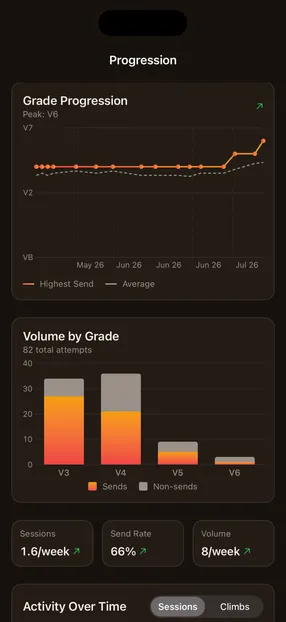
Long-term progression
Grade trends, volume by style, climbing days and your week streak. The changes you can't feel session to session, but that add up over a season.
Yours to keep
Export to JSON or CSV any time. No account needed, no lock-in.
How it works
From chalk-up to logged, without breaking the flow.
01Start
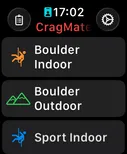
Pick your session.
02Log
Dial the grade. Tap the outcome.
03See
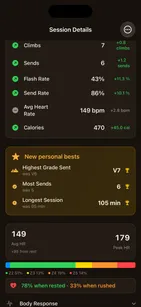
iPhone picks it up.
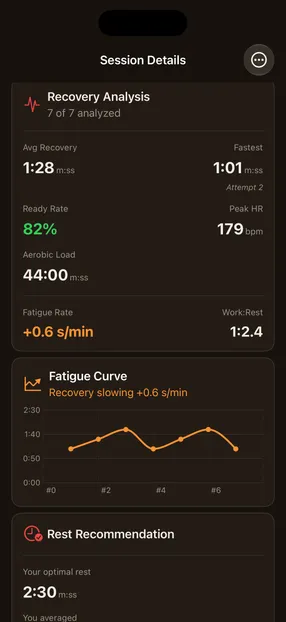
Recovery, not zones
Heart-rate zones lie to climbers.
Isometric contractions and arms-over-head positions inflate your heart rate - a zone chart can't tell trying hard from hanging on. So CragMate tracks the number that actually predicts your next attempt: how fast you recover between burns.
Fatigue curve
Watch it build across the session, attempt by attempt.
Ready rate
How often you pulled on actually recovered.
Rested vs. rushed
Your send rate, both ways. Spoiler: rest more.
On the wrist
Your hands are on the rock. Your logger should be on your wrist.
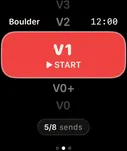
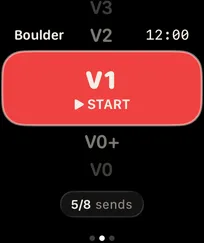
Most climbing apps stop at the phone. CragMate lives on your wrist, where your hands already are. Rotate the Digital Crown to pick a grade. Tap Send, Flash, Onsight, or Attempt. Always-On stays readable between burns without draining the battery. Your session syncs back to iPhone the moment you untie.
- 01Digital Crown grade picker. Monochrome dial, haptic on every click.
- 02Three-page swipe: grade → outcome → pause. Never hunt for the button.
- 03Always-On at 0.1 Hz - readable between burns, easy on the battery.
- 04Offline-first. Sync when you're home.
- 05"Rest met" shows when you've rested between attempts.
- 06Or just climb. In an indoor bouldering session the watch suggests the climbs it noticed, and you confirm each one on iPhone. Beta.
No account. No CragMate server. No lock-in. Your sessions live on your device - yours to keep, export, or delete, whenever you want.
Read the full privacy policyGDPR-compliant by design
Questions climbers ask
The ones I actually get.
Email me if yours isn't here - I answer every one personally, usually within two or three working days, and the answer often ends up in the next build.
How do I get CragMate?
It's free on the App Store. You'll need an iPhone on iOS 26+; the Apple Watch app (watchOS 26+) is where two-tap logging lives, but it's optional. No account, no sign-up.
Does the watch log my climbs automatically?
Not quite - it suggests them, and you decide. Start an indoor bouldering session on Apple Watch and just climb. Afterwards, open the session on your iPhone: confirm and grade each climb the watch noticed, tap "Not a climb" for anything that wasn't, and add any it missed. Nothing is logged until you confirm it. It's a Beta, indoor bouldering only for now, and a short trip up or down stairs can show up as a suggestion. You can still log every attempt on the watch in two taps, and turn suggestions off in CragMate Settings.
Does it work offline at remote crags?
Yes - everything works offline, no signal needed. Céüse, Siurana, the middle of nowhere in the Bugaboos - the watch logs it either way. Getting it onto your phone doesn't need the internet either: Watch and iPhone sync directly over Bluetooth/Wi-Fi once they're near each other again, not through the cloud.
Can I import from Mountain Project, Kaya, or 27 Crags?
Not yet. CragMate can export your sessions to CSV or JSON any time, but there's no import from Mountain Project, Kaya, 27 Crags, or anywhere else today.
Which grade scales are supported?
V-scale, Font, French, YDS, UIAA, and custom scales, set per session type - boulder in Font, clip bolts in French. CragMate never converts between them: a grade you logged in Font stays Font. Guessing that 7A is "about V6" is how a logbook quietly rewrites your history.
Android?
Not yet - iOS + watchOS at launch. Tell me if you want it. Demand is how I prioritize.